By AskGlyph · September 18, 2026 · 4 min read
Updated October 13, 2026
Use references for brand, poster and social media visuals
Define a reference's role, give your visual a clear brief, and check copy, framing and brand details before publication.

Measured in AskGlyph web · October 13, 2026
A coffee poster, then one color change
A new 3:4 coffee-launch brief with the exact headline "A NEW MORNING"; no brand logo or uploaded reference.
- Model or method
- Nano Banana 2 Lite
- Actual task total
- 80 Credits
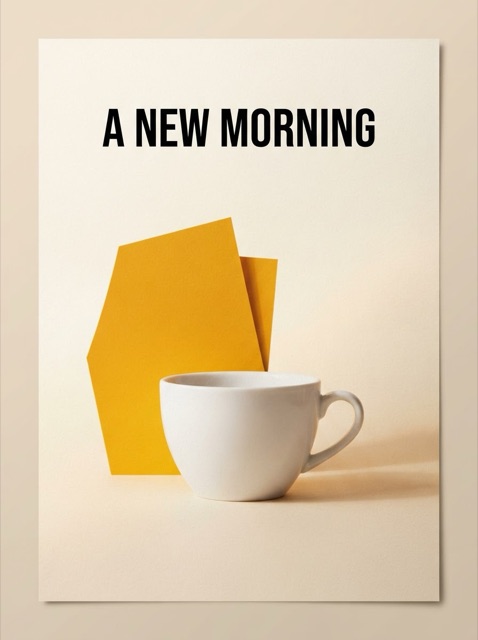
Generate one portrait poster with a white coffee cup, ivory background, saffron paper and the headline "A NEW MORNING".
The downloaded image contains the correct headline and a complete cup. Its 896 × 1200 frame is slightly narrower than the requested 3:4 ratio. We checked the lettering and margins at full size.
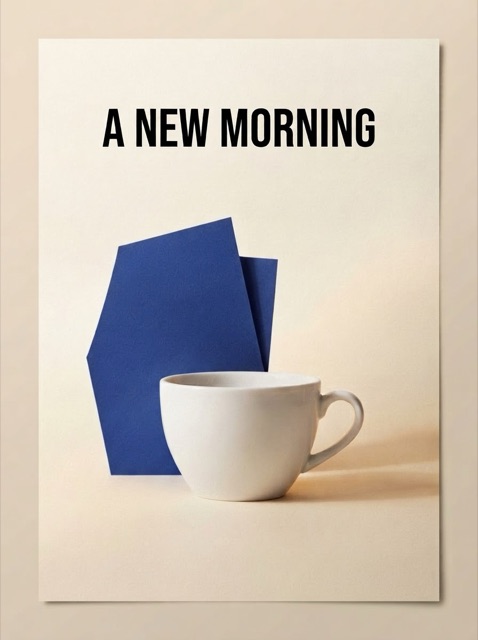
Change only the saffron paper to deep cobalt blue; keep the headline, cup, background and portrait composition.
The paper became blue, and the headline and overall composition remained recognizable. The final file was downloaded and inspected.
One completed generation and one completed image edit, 40 Credits each, including text work. These are recorded task charges, not the per-image operation prices.
Both versions downloaded as 896 × 1200 JPEG files. The images below are smaller previews.
This is one short English headline, not proof of reliable long copy, Chinese lettering, identical pixels or batch brand consistency. Final production typography still needs checking.
Can I use a reference for a branded poster or social image?
Yes. Describe the brand direction and what you want to make, then attach an image when it supplies a subject, palette, material or existing composition. AskGlyph can generate or edit a visual, keep the results in the same creation, and let you choose an image to continue refining.
This suits exploring campaign artwork, a poster concept or a social media visual. It does not replace exact brand production: generated lettering, logo shape and repeated style still need inspection. If you need editable typography, vector artwork, a source design file or guaranteed consistency across a campaign batch, finish the approved image in a suitable design tool.
Prepare the reference and the content
Use images you own or have permission to upload and reuse. Choose a clear reference, remove unrelated private details, and tell AskGlyph its role. For example: use this reference for its cream and cobalt palette only; do not copy its subject or lettering. A brand reference guides one request; it is not a guarantee of a persistent Brand Kit.
Provide the intended placement, exact headline, date, call to action and any text that must appear. Keep the copy short enough to inspect. State which brand details matter and what may vary, such as the background texture, geometric shapes or overall mood.
Choose the frame before creating
For a new image without a reference, open Create and choose a supported Image proportions option before submitting. For example, choose a vertical proportion for a poster direction or a square for a social post. A proportion is a framing request, not a promise of an exact pixel size or a platform-ready export.
After signing in, attach the reference and choose an edit-capable model if you are editing an existing visual. Check the model's reference-image limit. Reference editing starts from the source frame, and Refine keeps its original ratio. For a different placement, make a separate request or plan an intentional crop; inspect the result so headlines and subjects stay visible.
Write one brief with keep and change
Try this brief: Create a coffee launch poster. Use the attached reference for its cream and cobalt palette only. Keep generous space around the headline and a clear hierarchy. The exact text is "COFFEE AFTER HOURS", "FRIDAY 23 OCTOBER", and "BOOK YOUR TABLE". Change the artwork to sculptural paper and a simple coffee-cup silhouette. Add no extra words or logos. This is an illustrative brief, not a measured output shown on this page.
For brand artwork without text, omit the lettering and specify where final copy will be placed later. For an existing poster, identify the version to edit and name one change, such as a lighter background while keeping the headline area. A keep instruction is a requirement to review, not a technical lock on the reference.
Check the words and the brand details
Inspect every character, spelling, date and call to action at full size. Check reading order, contrast, margins and whether the complete text stays inside the frame. Then compare the reference's required colors, product features or distinctive marks with the result. Attractive similarity does not establish brand accuracy.
Select the result you want to continue, use Edit in chat or Refine, and make one request at a time. If exact lettering or a logo is essential, use the generated image as the visual foundation and place the approved text or logo in your design tool. Recheck it at the final display size before publication.
Budget, download and check the final placement
AI generation and edits require sign-in, an active plan or granted access, and available Credits. Paid Web plans start at $19.99 USD per month; this is a subscription price, not the price of one finished image. Open Pricing to estimate the selected model, completed images, edit rounds and assumed text usage. Local Refine position, size and background-color adjustments do not call an image model.
Count each image and each new AI edit in your budget. Creating another aspect-ratio version is another request and needs its own review; it is not a guaranteed batch adaptation. The Pricing calculator separates image charges from assumed text work. Record the turn’s total Credits from image details and keep the original reference alongside the chosen result.
Download saves the selected image in its existing format. A local Refine composite downloads as PNG with its selected background, rather than transparent artwork, vector paths or editable typography. Check the downloaded pixel dimensions and your intended crop in the publishing tool. The artwork, reference instructions and related prompt on this guide are illustrative starting points, not a measured brand-consistency or poster-generation case.
Posters and social visuals
- Bring
- An event or product, your exact message, a visual direction, and a target crop.
- Check before using
- Check every word, the crop and copy space; add final typography in your design tool when needed.
This starter fills your brief and requests generation proportions; check the model supports them. Edit it and attach your reference before sending. Reference edits keep the source frame; opening the starter does not start generation.
Cloud AI requires sign-in, an active plan or granted access, and Credits. Plans start at $19.99 USD/month. The budget calculator is an estimate; your task's actual cost depends on completed images, text work and edit rounds.